
Introducing Able Config: falls screening that fits the way you work
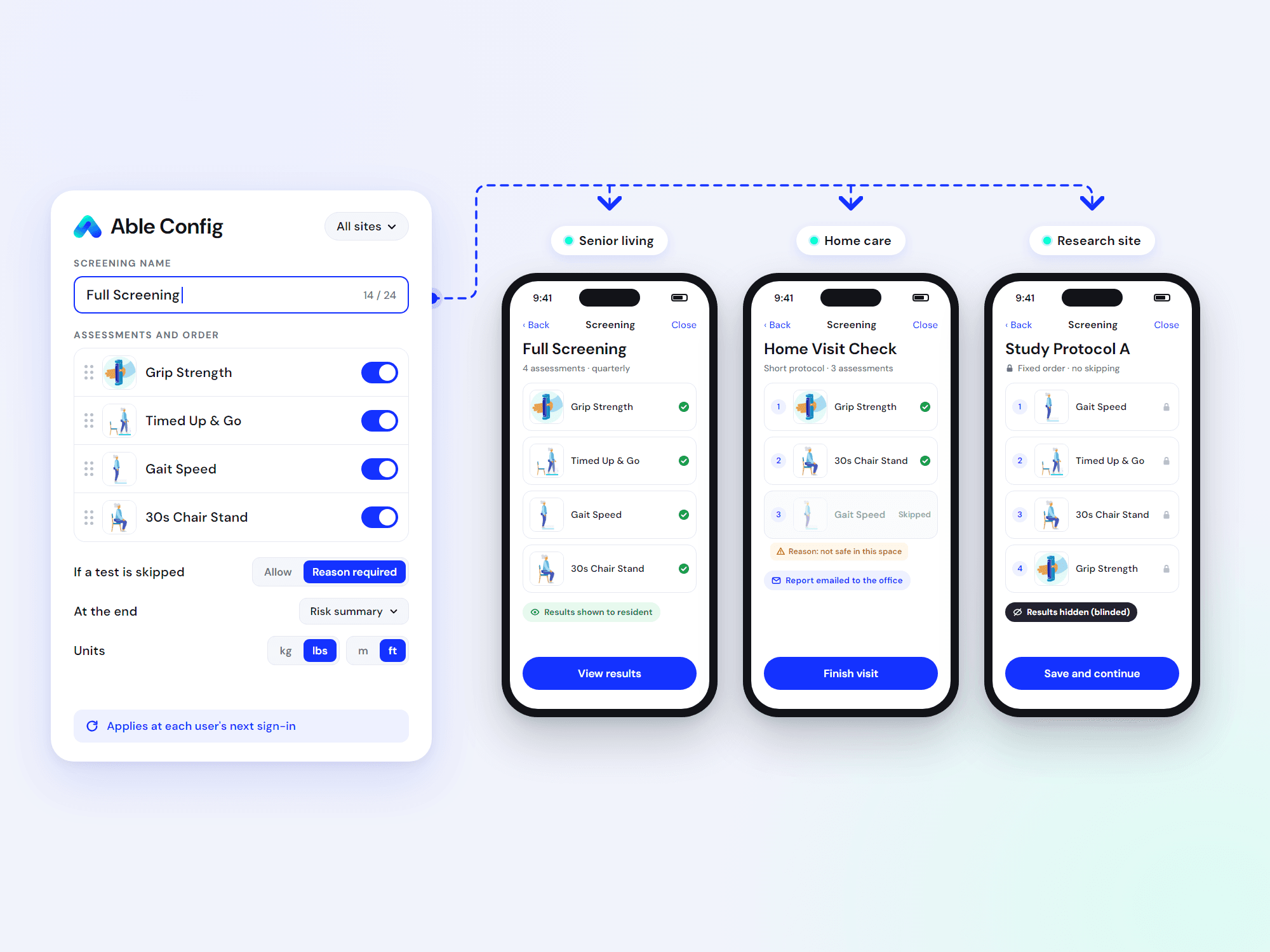
Tailor Able Assess to your protocol, your language and your reporting. Set centrally. No app update required.
No two services screen the same way. A senior living community runs a full battery every quarter and shows residents their results. A home care agency needs a shorter protocol, a recorded reason when a test can't be done safely, and a report back to the office. A research site needs a fixed protocol, nothing skipped, and results blinded from assessor and participant.
The assessments overlap. The workflows don't. Able Config closes that gap.
What is Able Config?
Able Config is a new feature that lets each customer customize how Able Assess is configured to suit their needs. You decide:
- Which assessments your clinicians can run, and what they're called on screen
- How screenings are built: which items, in what order, and whether each can be skipped (with or without a recorded reason)
- What happens at the end: risk summary, Able Score summary, an emailed report, or nothing shown at all
- Which PROMs are enabled, down to their questions, scoring and thresholds
- Which units results appear in: kg or lbs, meters or feet, ISO or US dates
It's configuration, not code. So what users see on the tablet matches what your systems receive.
How it works
Set it once for everyone, or site by site. Apply one configuration across your entire organization, or tailor it down to each individual facility. A research site can run a different protocol from your community sites, all within the same platform.
Start with our standard preset. Every customer begins with a standard configuration suited to their care setting. Want something different? The Able Care team will work with you to adjust it to fit your service.
Changes land at next sign-in. Able Assess picks up the latest settings each time a clinician signs in. No app store update. No install. If the connection drops, the app keeps working from the last known settings.
Why it matters for customers
Protocols that match practice. Screen the way your clinical guidelines call for, not the way the software assumes. Short in the home, comprehensive in the community, locked down for research.
Cleaner data, fewer gaps. Require a reason whenever a test is skipped, and record protocol deviations against a measurement. You see not just what was done, but why something wasn't.
Trends you can trust. Every result is stored against the configuration that produced it. A screening from last year reads exactly as it was run, so year-over-year comparisons hold up.
Research-ready. Fixed protocols, no skipping, and results hidden from the assessor and participant. Blinding is a setting, not a workaround.
Built-in safeguards. Display names are capped at 24 characters so they always fit on screen. Every assessment code is validated, so a typo can't silently switch off a test. And one customer's settings can never cross into another's.
Zero disruption. Changes reach your team at their next sign-in. Nothing for clinicians to install.
Get started
For now, the Able Care team manages configuration for you. Tell us what your service needs and we'll apply it across your organization or to a single site.
Planning a change to an existing protocol? Talk to us first. Renaming a test is always safe. Changing which items a screening contains shifts the mix behind the Able Score, so we'll help you start a clean new series without losing comparability.
Ready to make Able Assess work your way? Contact the Able Care team to get set up.